Keyboard / Mouse
External USB input device
Hardware-level input customization
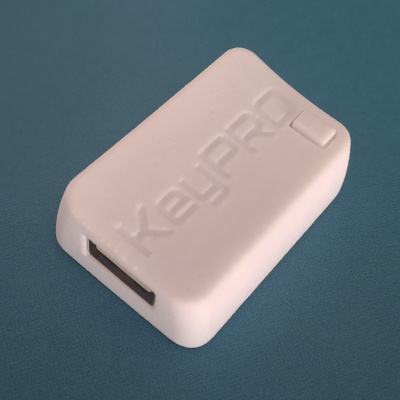
KeyPRO is a small USB device that sits between your keyboard or mouse and your computer. It adds remaps, shortcuts, repeated actions, and custom behavior that stay consistent across machines and operating systems.
Built for people who know what slows them down.
KeyPRO hardware
Keyboard / Mouse
External USB input device
KeyPRO
Inline input layer
Computer
Any USB host and OS
Windows, macOS, Linux, and web configurator
Why it matters
KeyPRO is not about one dramatic problem. It is about removing the small interruptions that break your flow throughout the day.
Many everyday routines stay manual longer than they should, even when they follow the same pattern every time.
Extra movement between key zones, layers, and mouse may seem minor in isolation, but it quietly adds up.
The function exists, but not where your hands naturally are. That mismatch adds friction every day.
A setup that works on one machine often breaks on the next, forcing you back into generic behavior.
What gets easier with KeyPRO
It helps you bring common actions closer, reduce repeated steps, and keep your setup more consistent across machines and operating systems.
Move actions closer to where they feel natural.
Trigger repeatable routines with a single input.
Reduce extra movement in repetitive workflows.
Keep more of your input habits when you switch systems.
How it works
KeyPRO sits between your input device and your computer, so the behavior you configure travels with the setup itself.
Plug KeyPRO between your USB keyboard or mouse and your computer.
Create remaps, shortcuts, repeated actions, and other behavior in the configurator.
Take a more consistent input layer with you across devices and operating systems.
See it in motion
A temporary layout can bring navigation closer without changing the rest of your keyboard.
Example use cases
Its value is not in doing everything. It is in removing the small interruptions that keep repeated tasks from feeling smooth.
Navigation keys like arrows, Home, and End often pull your right hand away from where it naturally rests. KeyPRO can bring them closer with a temporary layout, so moving through text feels more fluid.
Small wheel steps are fine until you need to move through long pages or documents. KeyPRO can change scrolling behavior on demand, so the same input becomes faster when the context calls for it.
Some editing actions are easy in one tool and awkward in another. KeyPRO can turn a repeated sequence into a portable trigger, so common edits feel more consistent across applications.
Beta access
KeyPRO is in beta and open to a limited number of early testers.
Core functionality is already in place, with ongoing refinement across compatibility, firmware, and setup experience.
The best candidates already have one repeated task, awkward shortcut, or cross-device setup they want to improve.
Applications are reviewed manually so beta spots stay focused and cover a range of real use cases.
FAQ
KeyPRO is a small USB device that sits between your keyboard or mouse and your computer, adding remaps, repeated actions, shortcuts, and other custom input behavior.
It is for people who already notice the small frictions in their setup — repeated tasks, awkward shortcuts, too much hand travel, or behavior that falls apart across machines.
KeyPRO is a hardware solution that, once configured, can work across different USB host devices and operating systems.
Software is only needed to configure KeyPRO. Once configured, it can be used without installing the same utility on every machine. Configuration can be done through the Windows, macOS, Linux, or web app.
No. KeyPRO is designed to change input behavior, not to capture or collect your data.
No. KeyPRO works with USB input devices. It is designed for external keyboards and mice connected over USB, not for built-in laptop keyboards or direct Bluetooth devices.
Not yet. KeyPRO is currently in beta and is not available for general purchase.
Stay close to launch
Join for availability updates and beta news. If you already have a concrete workflow in mind, use the beta application instead.